
RB2B AI: ASK US ANYTHING
This guide explains the most effective ways to identify website visitors by combining CRM integrations, behavioral analytics, and real-time visitor identification software. You’ll learn how to build richer visitor profiles, spot high-intent actions, and use leading tools, like RB2B, to uncover who’s on your site. For more insights on identifying website visitors, visit the RB2B blog.
According to a 6sense study, only 3% to 3.5% of B2B website visitors self-identify by filling out a form. That leaves roughly 97% of visitors unknown, creating a massive gap between the demand you've generated and the demand you can see. Website visitor identification is the way to close that gap.
Website visitor identification is the process of revealing which companies (company-level) or individuals (person-level) visit your site but didn't fill out a form, using methods like reverse-IP lookup, cookie/pixel tracking, and identity-graph matching.
Every click on your website holds hidden potential, whether it’s a prospect considering your services or a decision-maker browsing your content. Yet, without the right means, many of these visitors remain anonymous, leaving valuable opportunities unexplored.
Over the years, I’ve seen how identifying and tracking website visitors can elevate lead generation strategies, turning passive traffic into active business prospects.
In this guide, you’ll discover some of the best strategies you can use to identify website visitors in real time. What’s more, you’ll also find a 100% FREE solution that can reveal critical insights about the individuals interacting with your site, helping you turn anonymous traffic into meaningful opportunities.
Website visitor identification generally happens at two levels: company-level and person-level. Understanding the difference helps you know what information an identification tool can actually give your team.
Company-level identification uses reverse-IP lookup to match a visitor’s IP address against registered corporate IP ranges. It tells you which organization is on your site. It's the cheaper, more grounded approach, and it works worldwide. It also doesn’t identify an individual, so you're not dealing with the same personal-data considerations that come with person-level identification. The tradeoff is that you still don't know whether the visitor is a decision-maker or an intern.
Person-level identification goes further. It layers in an identity graph, cookies, and pixel signals to resolve a visit down to a named individual. You can get a name, job title, and contact details. That's far more useful when a rep needs to follow up, but it also requires more data and comes with greater privacy considerations. Most person-level tools, RB2B included, focus on U.S. traffic, since that's where identity graphs have the most data.
Some tools specialize in one level of identification, while others offer both. The right option depends on what you need from your visitor data: if you mainly want to know which accounts are engaging with your site, company-level identification may be enough. But if you need to know who's actually visiting for sales outreach, you'll want person-level identification, or both.
Match rate is one of the most important things to look at when comparing website visitor identification tools. After all, a tool isn’t much use if it can only identify a small fraction of your traffic.
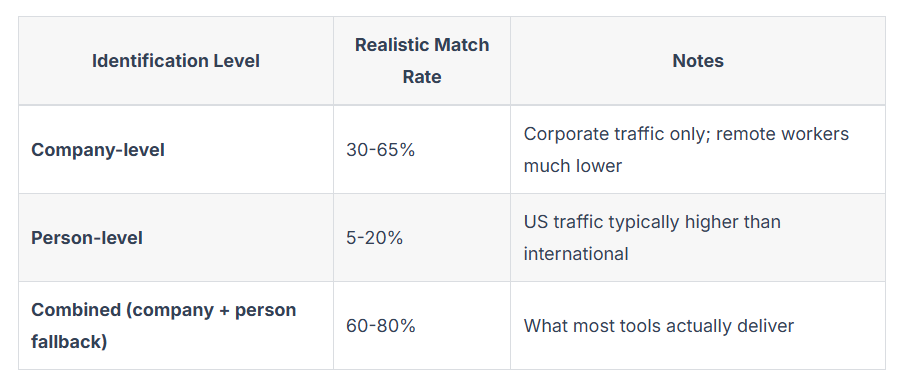
For company-level identification, independent 2026 benchmarks put typical match rates at roughly 30% to 65% of U.S. B2B traffic. Person-level identification is harder, with typical rates closer to 5% to 20%, although some vendors claim rates as high as 30% to 40% on U.S. traffic.
Your visitors' connection type can make a big difference, too. One 2026 industry benchmark found company-level match rates of around 50% to 65% for large-enterprise office traffic on static IPs. That dropped to 30% to 45% for smaller companies and 10% to 20% for remote employees, whose home and mobile connections rarely map back to their employer.
When choosing your identification tool, it’s worth looking for platforms that publish their own match rates rather than choosing based on generic industry figures or vendor comparisons.
RB2B, for example, publishes its person-level identification rate. Its Pro plan identifies roughly 40% to 45% of unique U.S. traffic at the person level, with another 30% to 35% identified at the company level. That's a combined 70 to 80% of your visitors identified across both identification levels.
If accuracy and coverage are priorities, having those numbers upfront makes it easier to judge whether a tool will deliver enough usable data for your team.
Website visitor identification uses 4 main methods:
Reverse-IP lookup is the oldest method here, and it's still the backbone of company-level identification. When someone visits your site, their request includes an IP address. The tool checks that address against WHOIS and internet registry records to see which organization owns the IP range. If it can make a match, you get information like the company name, industry, size, and location.
That works well when someone is browsing from an office on a static connection. But what happens when they're working from home, using a mobile connection, or behind a VPN? Those connections usually don't resolve back to an employer, so there's no company to match. That's the main reason company-level match rates can vary so much
Reverse-IP lookup tells you who owns the connection, but you also need a way to recognize what happens during and after a visit. You can use cookies and pixels for that.
A lightweight JavaScript pixel installed on your site captures information about each visitor's session, like their device type, browser, and pages viewed. On its own, the pixel can only tell you that the same anonymous visitor came back. When it's paired with a cookie, though, it can carry that identity across visits. So once someone has been identified, they can potentially be recognized the next time they return.
This tracking layer sits underneath both company-level and person-level identification. That's why installing the tracking script correctly is the first step for virtually every tool in this category, including RB2B.
Cookies and pixels will tell a tool that a visitor has returned, but they don't tell you who that person is. That's where identity-graph matching comes in.
An identity graph connects identifiers like cookies, devices, hashed emails, and IP addresses to individual profiles built from prior opt-ins and other signals. When your pixel captures a session, the tool checks those signals against the graph. If it finds a confident match, it can return a name, job title, company, and contact details instead of just a company name.
The tradeoff is coverage. Identity graphs rely heavily on U.S. data, which is why most person-level tools, RB2B included, are strongest on U.S. traffic and have thinner coverage elsewhere.
The fourth method works a little differently. It doesn't identify a visitor from scratch. Instead, it takes a visitor you've already partly identified and checks whether they match someone already in your CRM.
For example, a tool can match an identified visitor against records in your HubSpot or Salesforce instance. If it's a returning visitor, you can tie them to their existing account instead of treating them as a brand-new lead. If there's no match, a new record can be created automatically.

This step is what makes the other three methods useful day-to-day. Reverse IP, cookie, pixel, and identity-graph matching tell you who's on your site. CRM de-anonymization puts that information where your sales and marketing teams already work instead of leaving it in a separate dashboard nobody checks.
Here are some of the best tools you can choose in 2026 for unmasking your website visitors. Each uses one or a mix of the four methods above.
For the full breakdown of these tools, their pricing and features, see our best website visitor identification software guide.
The short answer is yes, but the rules depend on what you're identifying, where your visitors are located, and how you use the data.
Company-level identification generally identifies an organization rather than an individual, so it involves fewer privacy considerations. Person-level identification is different because it connects a visit to a named individual. That brings personal-data rules into play, and those rules vary by location.
In the United States, the CCPA and CPRA are the main regulations to consider. In the European Union, GDPR applies when you’re processing someone’s personal data. Here's what these three rules cover:
When you know exactly who’s visiting your site, you unlock a clear picture of what your audience is truly interested in. Visitor identification tools capture valuable data points like the visitor’s industry, company size, and key pages visited. These insights allow marketing teams to fine-tune their messaging and approach based on the real behaviors and needs of their audience.
For instance, seeing decision-makers from tech companies consistently visiting our solution comparison pages suggested a specific interest in weighing options. When my team recognized this pattern, we shifted to tailored campaigns focused on these specific interests. The result was not only higher engagement but also deeper conversations with prospects who felt seen.
Visitor identification isn’t just about capturing who visits your site; it’s about using that data to refine your marketing spend and drive real results. When you know your audience’s demographics and behaviors, you can direct your resources toward efforts that have the highest likelihood of yielding a return.
Here’s how focusing on identified visitors can help maximize ROI:
Sales teams often face the challenge of filtering out unqualified leads. Visitor identification tools help solve this by providing detailed insights into the actions and interests of prospects, allowing sales reps to prioritize those who show clear buying intent.
Below is a comparison of using traditional lead qualification methods versus visitor identification:
Having access to the deep level of insights offered by visitor identification has allowed us to focus follow-ups on visitors who frequently check pricing pages or download key resources.
Beyond gaining insights into visitor behavior, identifying anonymous website visitors also helps businesses improve engagement, sharpen messaging, and build trust—ultimately driving higher conversions. By understanding your website visitor demographics and what they want, you can effectively shape interactions to guide them toward becoming loyal customers.
From my experience, here are three key ways visitor identification can boost your conversions:
Visitor identification allows you to align your messaging with visitors’ specific motivations. When you know which pages are holding their attention, such as pricing or product comparison pages, you can adapt your communication to address their key concerns directly.
For instance, if your data shows frequent visits to comparison pages, it signals that visitors are evaluating their options. You can use this insight to craft follow-up messages highlighting your product’s unique strengths and addressing common decision-making factors, such as cost or features. This approach connects with visitors at the right moment and addresses what matters most to them, increasing conversion rates.
Visitor identification doesn’t just reveal who’s visiting; it tells you what they care about. By pinpointing which content consistently engages visitors, you can fine-tune your strategy to keep prospects interested and deepen their journey toward conversion.
Here’s how visitor identification helps increase engagement:
When you deliver content that feels tailored to your visitors, you’re more likely to hold their attention, build credibility, and encourage further exploration of your offerings.
Website visitor tracking enables you to recognize patterns and anticipate what your visitors need, often before they even realize it themselves. Instead of relying solely on reactive follow-ups, you can take a proactive approach that demonstrates you understand and value your visitors’ journey.
For example, let’s say you spot multiple decision-makers from a company frequently exploring case studies and pricing pages. This pattern indicates serious interest. Reaching out proactively with detailed ROI reports or customer success stories relevant to their industry shows that you’re not just paying attention, you’re invested in their success.
For me, proactive outreach enables me to:
Taking this approach builds trust with a clear message: You’re engaged, knowledgeable, and committed to helping your prospects succeed.
Whichever tool you choose, getting it up and running looks pretty similar:
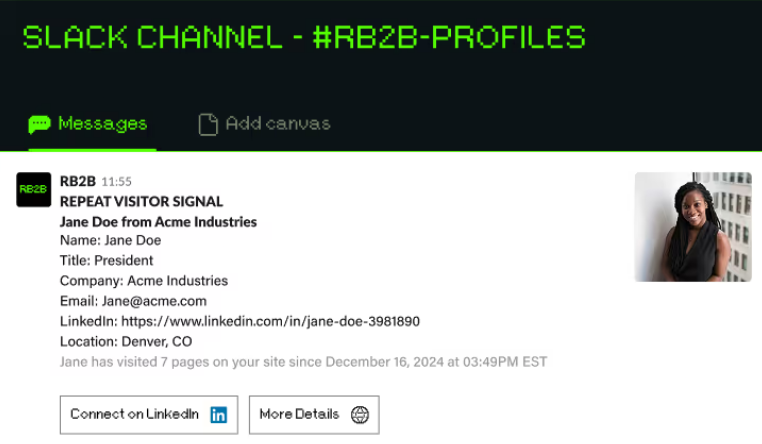
The install itself only takes a few minutes. What really determines whether those alerts are useful is how accurate your ICP definitions are and how quickly reps act on qualified leads.
Being able to identify your website visitors is no longer just a nice-to-have; it’s an essential part of optimizing your lead generation strategy. The difference between passive views and actionable insights lies in how well you can understand who’s visiting, what they are interested in, and when they are most ready to engage.
Tools like Apollo, ZoomInfo, and Albacross can help you uncover valuable data about the companies exploring your site, but RB2B takes it a step further by providing real-time, person-level insights. By integrating these tools into your workflow, you can react to potential leads in real time, delivering timely, relevant outreach that significantly boosts your chances of conversion.
Sign up for RB2B's Person-Level Website Visitor ID tool to turn anonymous traffic into genuine business opportunities, creating meaningful connections with high-value prospects.
Bonus read: Check out our in-depth reviews and comparisons of top lead generation tools:
Alert your reps, start automated outreach, and add to lead score in under five minutes.

